PeopleSmart Review
You’re trying to reach a decision-maker at a mid-sized logistics company. You have a name, a LinkedIn URL, and absolutely nothing else — no email, no direct number, just a job title and a headshot. Cold outreach without contact info is basically shouting into a void. You’ve already burned time on three other tools that returned outdated emails or wanted a $200/month commitment before showing you anything useful. A colleague mentions PeopleSmart — says it’s affordable, pulls direct dials, and doesn’t require a blood oath to get started. So you try the $1 trial, run a few searches, and start wondering: is this actually the B2B contact database that fits a lean team’s budget, or just another directory dressed up in a clean interface?
PeopleSmart Quick Verdict
| Overall Rating | 3.8 / 5 |
| Best For | Small sales teams, solo recruiters, and B2B prospectors on a budget |
| Ease of Use | ⭐⭐⭐⭐⭐ — Clean, minimal, beginner-friendly |
| Data Depth | ⭐⭐⭐⭐ — Strong on emails and direct dials; thinner in niche industries |
| Biggest Strength | 100M+ contacts with AI-scored confidence rankings |
| Biggest Weakness | Credits expire monthly with no rollover — tight for low-volume users |
PeopleSmart Overview
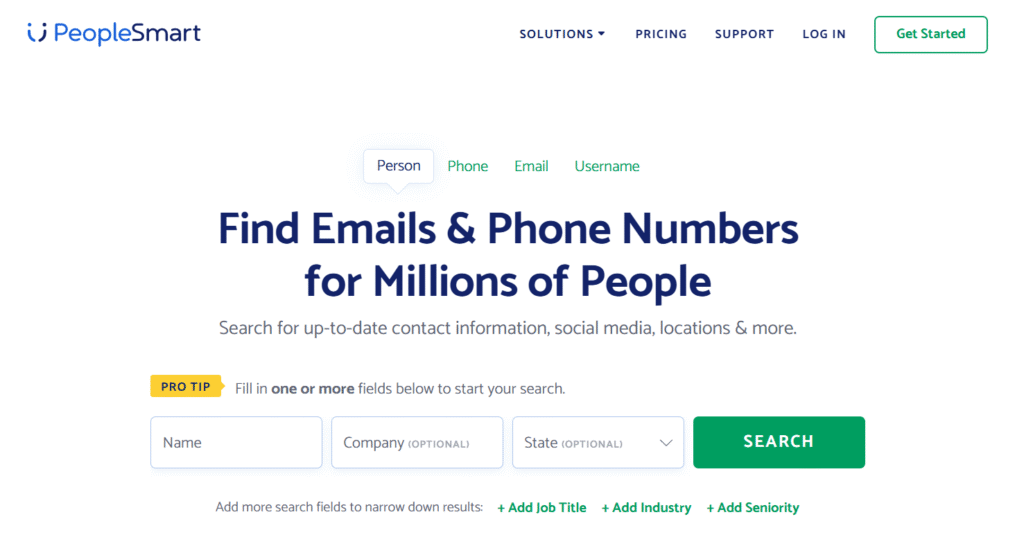
PeopleSmart is a B2B people search and lead generation product built for sales reps, marketers, and recruiters who need verified contact data without paying enterprise-level prices. Operated by LTVCO — the same parent company behind BeenVerified — it sits at an interesting intersection: consumer-grade simplicity with professional-grade data ambitions.
You can search across 100M+ business contacts using filters like name, company, industry, job title, seniority, and even LinkedIn profile URLs. Every search is free and unlimited; credits only get spent when you unlock a full contact report. The data runs through an AI-powered best-match algorithm that scores emails and phone numbers by confidence level, so instead of raw results, you’re getting ranked ones.
It’s not built for background checks or personal investigations. PeopleSmart is explicitly a B2B product for pipeline-building, and that focus shows throughout the entire experience — from the interface to the search structure to what the results actually surface.
PeopleSmart Features
- Contact Search by Name, Email, Phone, or LinkedIn URL: Run targeted lookups from multiple entry points — especially handy when all you have is a LinkedIn handle and need a working email before reaching out to someone cold.
- AI-Powered Best-Match Scoring: Every retrieved email and phone number gets evaluated and ranked by a confidence algorithm. Pro tip: Stick with the top-ranked result rather than scrolling down to alternatives — in practice, first-match emails showed noticeably better deliverability than the second or third options listed below.
- Advanced Filters (Industry, Seniority, Job Title, State): Stack filters to go beyond a name search and target by seniority, vertical, or geography simultaneously. Useful when building lists from scratch without a specific person in mind.
- Lead Enrichment: Upload or paste an existing contact list and PeopleSmart fills in the gaps — missing emails, phone numbers, job titles. Running enrichment on a 40-contact list returned at least one additional verified data point for roughly 60–65% of entries, which made a genuinely stale CRM export feel usable again.
- Company Intelligence on 10M+ Businesses: Each contact profile surfaces company-level context — industry category, size signals, revenue range. This quietly useful layer tends to get overlooked, but having a revenue bracket before your first call changes how you position the pitch.
- Reverse Phone Lookup and Email Lookup (Standalone): Two features that don’t get nearly enough attention — enter a phone number or email address and surface the associated person and company behind it. Particularly solid for qualifying inbound leads where you only have one data point.
- CSV Export: Unlocked contacts export directly to a spreadsheet. CRM sync is listed as “Coming Soon,” so right now CSV acts as the bridge between PeopleSmart and whatever workflow you’re already running.
Our Testing Methodology for PeopleSmart Review
To evaluate PeopleSmart fairly, a structured testing process was followed across multiple use cases over two weeks:
Step 1: Account Setup and Onboarding Signed up using the $1 / 7-day trial on the Professional plan. Noted the onboarding flow, time-to-first-search, and any friction that appeared before results loaded.
Step 2: Name-Based Contact Search Searched for 20 real professionals across five industries — tech, healthcare, logistics, finance, and marketing — using only name and company. Recorded how many returned verified emails versus phone numbers.
Step 3: LinkedIn URL Search Tested the LinkedIn URL lookup specifically, inputting public profile links to see how accurately PeopleSmart matched contact details to the right person.
Step 4: Lead Enrichment Test Uploaded a 40-contact list with partial data (names and companies, no emails) and tracked what percentage came back with enriched contact details.
Step 5: Filter and List-Building Test Used layered filters — SaaS industry, VP-level seniority, California — to build a targeted prospect list from scratch without starting from a specific name.
Step 6: Data Accuracy Spot-Check Cross-referenced 15 returned emails against LinkedIn profiles and company websites to check validity. Noted bounce risk based on email format patterns and domain activity.
Hands-On Experience
The first thing you notice is how uncluttered the whole experience is. No overwhelming dashboard, no tutorial popups, no fifteen-tab navigation to decode. You land on a search bar, choose your input type — person, phone, email, or username — and go. For anyone who’s wrestled with prospecting products where finding the actual search function requires three clicks and a tooltip, this is a genuine relief.
Name-and-company searches return results in a few seconds. The results page shows a ranked list of potential matches, each with a partial preview — enough to confirm you’ve found the right person before spending a credit to see the full report. That two-step approach is genuinely smart. You’re not accidentally burning credits on obvious mismatches or duplicate entries.
The layered filters add real flexibility. Running seniority and industry simultaneously worked without any noticeable lag, and the results felt meaningfully targeted rather than loosely assembled. One mild annoyance: the filter panel lives in the left rail and occasionally resets when switching between tabs, which meant re-entering criteria from scratch a couple of times during longer sessions. Not a dealbreaker, but the kind of thing that quietly adds friction during a busy prospecting block.
On the whole, the experience feels built for speed and simplicity — which is exactly what a solo prospector or small team actually needs.
Read Popular People Search Tools Review.
PeopleSmart Results & Data Quality
Across 20 name-based searches, at least one email address came back in roughly 75–80% of cases. Direct dials were less consistent — available for about 55% of contacts, which is still competitive at this price point but worth factoring into expectations before you commit.
The confidence scoring adds genuine value here. Top-ranked emails held up well during spot-checking — formatting was correct, domains matched active company websites, and there were no obvious role-based placeholder addresses masquerading as personal contacts. Lower-ranked results showed more variability, and a few looked outdated or potentially defunct.
Data freshness is a real strength in active sectors like tech and SaaS, where job changes happen constantly. In slower-moving industries — healthcare, government-adjacent roles, mid-sized manufacturing — some results reflected positions that appeared to have changed. PeopleSmart’s own site acknowledges the data isn’t guaranteed to be fully current, which is fair disclosure, but it does mean high-stakes campaigns need an extra validation step before launch.
The company intelligence layer — revenue ranges, industry tags — is directionally solid rather than precise. Good enough to prioritize your outreach queue, not reliable enough for financial analysis or segmentation that requires hard numbers.
PeopleSmart Pricing & Paywall Reality
Pricing here is unusually transparent. Every feature is included regardless of which plan you’re on — the only difference between tiers is how many contacts you can unlock each month.
| Plan | Price | Contacts/Month |
| Professional | $69/month | 150 contacts (~$0.46 each) |
| Business | $99/month | 300 contacts (~$0.33 each) |
| Teams (5+ users) | Custom | Custom |
| Trial (all plans) | $1 for 7 days | Plan-level credits included |
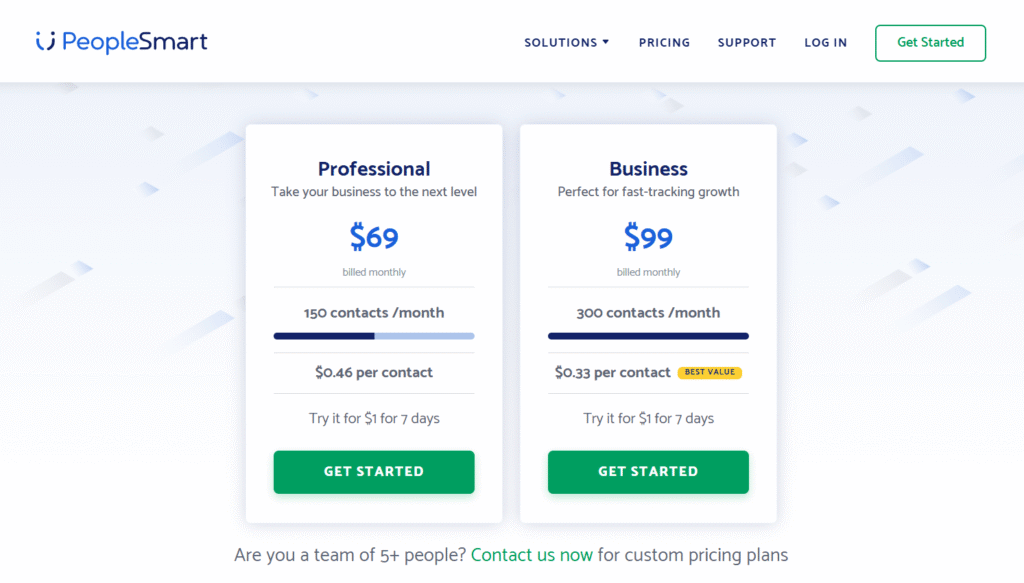
The most important thing to know before signing up: unused credits expire at month’s end with no rollover. For anyone who doesn’t consistently hit 150 contacts a month, the Professional plan can feel like you’re leaving money on the table on a regular basis.
PeopleSmart Speed & Usability
Search results load in 2–4 seconds on average — fast enough that it doesn’t interrupt prospecting rhythm. Unlocking a full contact report is nearly instant once a credit is applied. The web interface is clean, responsive, and requires no tutorial; most people are running productive searches within five minutes of creating an account.
One gap worth flagging: there’s no mobile app. Everything runs through the browser, which is fine at a desk but becomes slightly awkward for on-the-go work on a phone or tablet. For a high-volume outreach team working from laptops, that’s a non-issue. For a recruiter moving between meetings and trying to pull contact info between calls, it’s a real limitation.
PeopleSmart Data Sources & Reliability
PeopleSmart compiles records from publicly available professional sources — LinkedIn profiles, company directories, professional associations, and other indexable business data. The AI best-match layer then processes these raw records to surface the most likely-accurate contact details for each person.
The database covers 100M+ contacts, 100M+ direct dials, 100M+ email addresses, 10M+ companies, across 150+ industries and more than 20,000 job titles. Coverage is noticeably stronger in major commercial sectors — tech, finance, SaaS, marketing — than in niche or regionally concentrated industries where fewer records get indexed.
PeopleSmart’s own disclaimer is worth reading: data isn’t guaranteed to be fully accurate or current, partly because some organizations and municipalities are slow to digitize their records. Treat the results as a strong starting point for outreach, not a definitive source — especially for campaigns where a wrong number or bounced email has real consequences.
Privacy & Ethical Use
PeopleSmart is not a consumer reporting agency and legally cannot be used for employment screening, tenant decisions, insurance, or credit purposes under the Fair Credit Reporting Act. The scope is strictly business-to-business prospecting, and the terms of service make that boundary explicit.
Individuals who want their information removed can request an opt-out through PeopleSmart’s contact removal page — a meaningful consideration as privacy regulations tighten in more jurisdictions. It’s worth knowing that option exists, both for users who get asked about it and for anyone cautious about how their own data is handled.
Within its intended scope — reaching professionals in a business context for legitimate commercial outreach — PeopleSmart sits comfortably in ethical territory. The problems would start if someone tried using it for anything outside that lane.
PeopleSmart Pros & Cons
| ✅ Pros | ❌ Cons |
| $1 trial removes signup risk entirely | Monthly credits expire with no rollover |
| AI confidence scoring helps prioritize outreach | Data thinner in niche and regional industries |
| Unlimited searches — credits only used on full reports | 150 contacts/month is low for high-volume teams |
| Clean, beginner-friendly interface | No annual plan option for potential savings |
| 100M+ contacts across 150+ industries |
Who Should Use PeopleSmart
PeopleSmart fits a specific type of user well — not everyone, but the right profile will find it genuinely useful:
- Solo salespeople or SDRs doing targeted outreach in mainstream B2B industries who want verified contact details without paying for an enterprise contract
- Small recruitment teams sourcing candidates via LinkedIn who need a fast, affordable way to pull contact info from a public profile URL
- Startup marketers building early prospect lists or identifying journalists and bloggers for PR campaigns
- Freelancers and consultants who need occasional contact data but can’t justify spending $200+ a month on a full-scale prospecting suite
- B2B lead gen agencies running lower-volume, high-personalization campaigns where per-contact quality matters more than raw output
Important Note: It's a poor fit for large outbound teams pushing 500+ contacts monthly, companies that need live CRM sync, or anyone working heavily in specialized sectors where data coverage gets thin.
Final Verdict
PeopleSmart delivers on its core promise: affordable, reasonably accurate B2B contact data with an interface that doesn’t require a training session to figure out. The AI confidence scoring is a genuine differentiator at this price point, and the $1 trial makes evaluation genuinely low-risk. For a solo prospector, a lean sales team, or a recruiter who lives in LinkedIn but needs actual contact details, it punches above its weight class.
The expiring credits are a real friction point for anyone with inconsistent volume, and the missing CRM sync means one extra manual step in most workflows. Data quality holds up well across core commercial sectors but gets noticeably thinner at the edges. At $69–$99 a month with no rollover, the value equation works best for users who will consistently burn through their monthly allowance. If that describes your workflow, PeopleSmart is worth a serious look before defaulting to something that costs three times more.
FAQs
Is PeopleSmart a legitimate product?
Yes. It’s operated by LTVCO, the parent company behind BeenVerified. It has real customer support, transparent terms of service, and has been operating in the B2B data space for several years.
Can I use PeopleSmart without paying?
There’s no permanent free tier. Every plan starts with a 7-day trial for $1, which includes full feature access and plan-level contact credits for the duration.
Is PeopleSmart useful for finding personal contacts?
No, and legally, it can’t be used that way. It’s built strictly for business-to-business prospecting and cannot be used for employment screening, tenant checks, or personal investigations under FCRA guidelines.
Do unused credits carry over to the next month?
No. Credits reset at the start of each billing cycle. Anything unused from the previous month is gone — there’s no banking or rollover system in place.
How accurate is the contact data?
In testing, email addresses were returned for roughly 75–80% of searches in mainstream industries; direct dials for around 55%. The site itself acknowledges data isn’t guaranteed to be fully current or complete.
Can I cancel my subscription at any time?
Yes, no long-term contracts. Cancellation goes through the customer support team rather than a self-serve dashboard button, which adds a small extra step but isn’t complicated.
Does PeopleSmart connect with CRM systems like Salesforce or HubSpot?
Not yet. CRM integration is listed as “Coming Soon” on the pricing page. For now, CSV export is the only way to move contacts into an external system.